July 28th, 2025
New
Feature
FourKites Location Feed
Deliver live shipment visibility to your customers with a simple FourKites connection—no extra driver steps required. Connect your FourKites account, choose which shippers/brokers to share with, and cut down on check calls and tracking-link requests.
Why connect?
Always‑on tracking – Location data from the Vektor Driver App and/or connected ELDs streams to FourKites in real time.
Shared source of truth – Your customers see the same location, status, and ETA data you see in Vektor—fewer check calls and no surprises.
Granular sharing controls – Decide exactly which customers receive your feed; enable/disable any time.
Zero‑code setup – Activate in minutes from the Vektor Integrations marketplace.
How to enable the integration
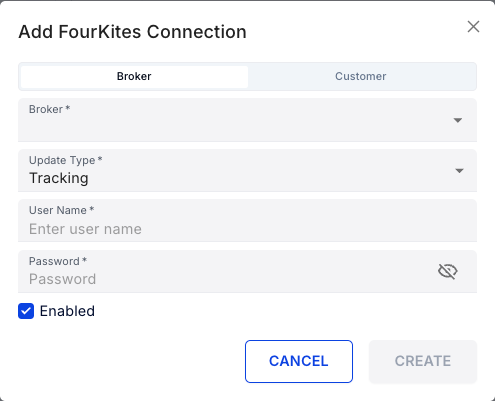
Sign in to Vektor TMS and open Settings ▸ Integrations ▸ search for FourKites
Click New Connection and pick the customer you want to share data with.
Select the update types to send—Tracking, Status, and/or Assignment.
Press Create. That’s it! Your FourKites feed goes live instantly.
Enjoy a smoother, more transparent shipping experience—with fewer phone calls and faster answers—while we continue refining Vektor for your needs.