January 8th, 2025
New
Improved
Fixed
Feature

Local Schedules, Order Templates, Tours, Truck Posting, Unmerge Manifests, Academy & More
This update reflects our commitment to listening to your feedback and delivering tools that simplify workflows, improve visibility, and drive productivity.
From innovative scheduling options for local driver planning to enhanced integrations like Amazon Relay and TruckStop, this release is all about empowering your business to operate smarter. We’ve also introduced new tools for financial control, streamlined document handling, and expanded ELD integrations to ensure seamless connectivity.
Whether you’re optimizing driver shifts, managing bulk load tours, or improving billing workflows, this update is built to help you scale your operations with ease. Let’s explore the new features!
Schedules: A New Way to Plan Manifests for Drivers
Our new scheduling feature introduces a more flexible and efficient way to manage driver shifts, particularly for local operations. It’s designed to simplify planning when you need to organize multiple manifests within a single schedule—without merging them. Key functionalities include:
Plan Shifts with Multiple Manifests: Group multiple manifests into one shift for better organization and planning.
Create Recurring Schedules: Easily set up recurring shifts to identify and manage your capacity over time.
Specify Start/End Times and Locations: Customize each shift with precise start and end times, as well as specific locations.
Dispatch Shifts Like Mega Manifests: Treat the entire shift as a single, consolidated manifest for streamlined dispatching.
Shift Printouts: Generate large printouts displaying grouped manifests, simplifying driver planning and communication.
This feature is ideal for local driver planning and helps you optimize capacity while maintaining flexibility.
Tours for Bulk Load Brokerage
Introducing support for managing “Tours”—a powerful new feature designed to streamline bulk load operations. Tours are sets of loads that can either be received from brokers or brokered out, providing enhanced visibility and control over grouped orders & manifests that are not directly connected.
Key benefits include:
Efficient Load Management: Organize multiple trips into a single, manageable set for better operational clarity.
Scalable Brokerage: If you’re a broker, easily create and broker these sets at scale to optimize your workflow.
Order Templates
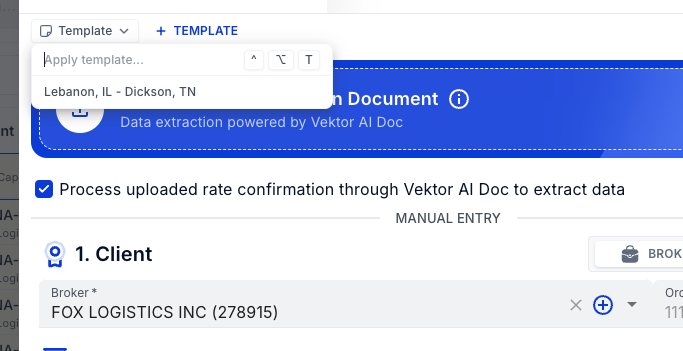
Do you have a lane that frequently repeats for a specific customer? Save time and effort by creating a Customer Template! With this feature, you can:
Streamline Order Creation: When drafting an order, simply select the customer, and the template will automatically populate all the necessary fields.
Eliminate Repetition: Avoid manually entering the same details repeatedly for recurring lanes.
This functionality ensures faster, more efficient order creation, helping you focus on what matters most—your operations.
Manifest Unmerge
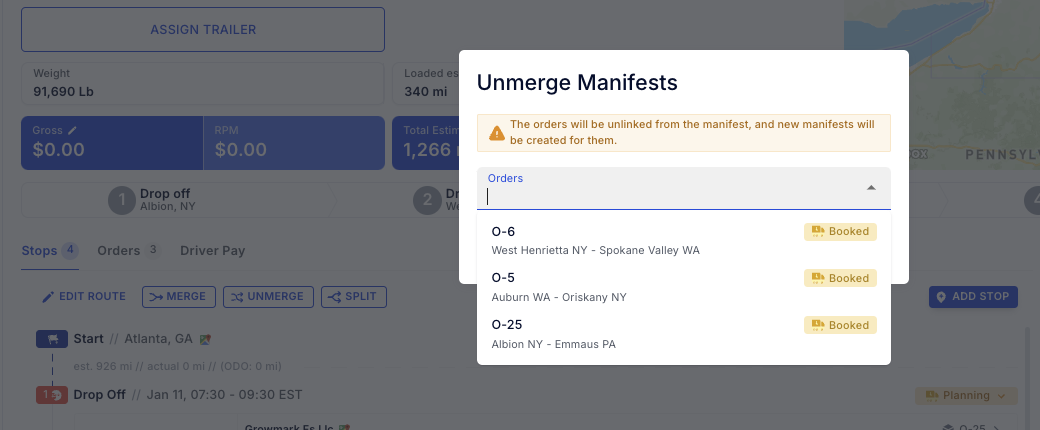
The new Manifest Unmerge functionality is here to give you greater flexibility in managing your operations. This feature allows you to separate a previously merged manifest whenever needed, making it easier to adjust and reorganize your workflows.
How it Works:
Let’s say Manifest 16 includes Orders 5, 6, and 25. When you unmerge, the system:
Restores the original manifest.
Removes the selected order(s) and places them into their own separate manifest.
Automatically adjusts the original manifest to reflect the changes.
This feature ensures seamless reorganization of manifests, helping you maintain operational efficiency and adaptability.
TruckStop Truck Manual & Auto Posting
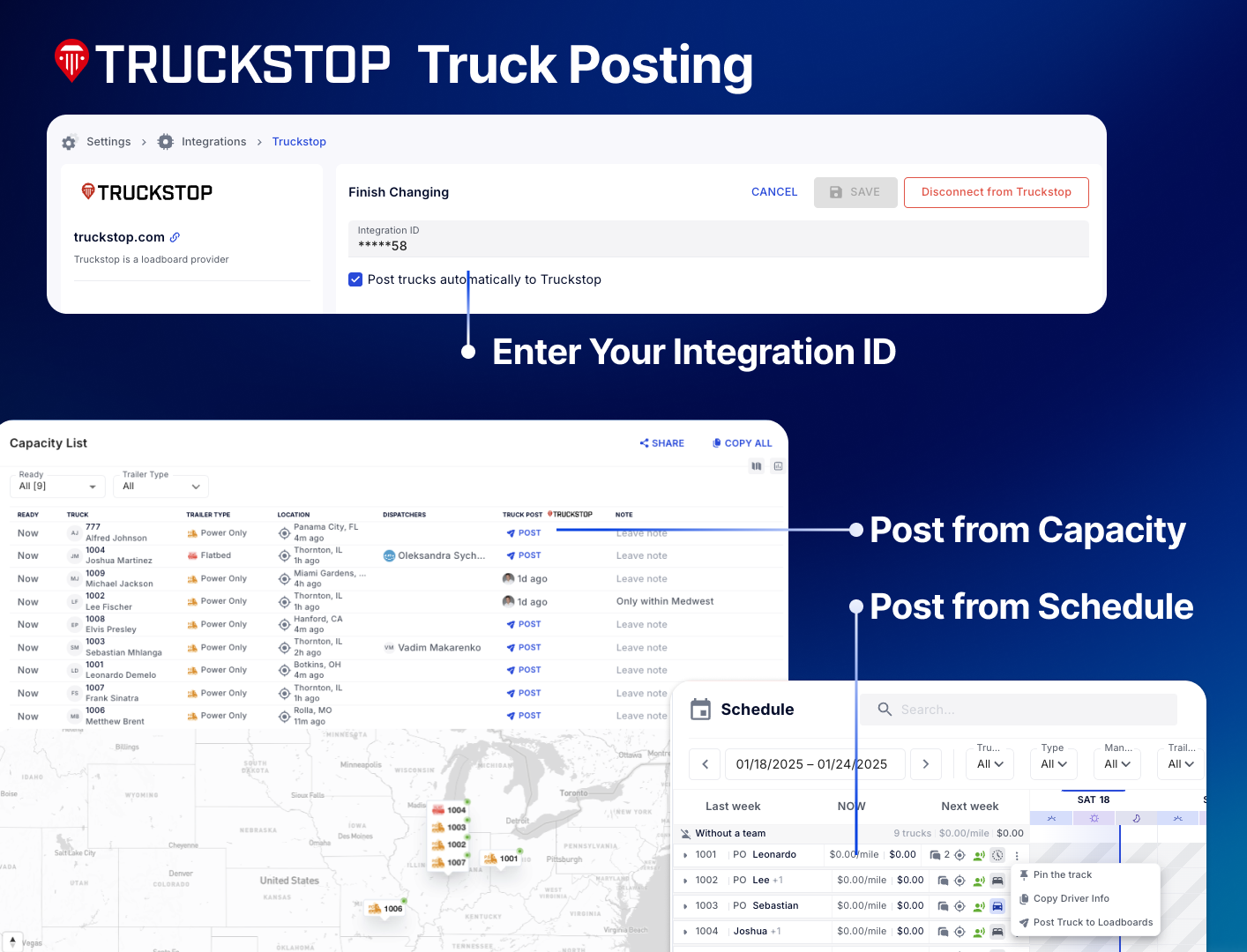
We’ve made truck posting simpler and more efficient with both manual and automated options! By connecting your TruckStop account, you can streamline capacity posting with just one click—or even no clicks at all by enabling auto posting.
How Auto Posting Works:
When a truck is online and doesn’t have a load, it will be automatically posted and refreshed every hour.
Once the truck is covered, the old posting will be removed, and a new posting will be created for the destination of the driver’s next manifest.
How Manual Posting Works:
Easily post and unpost trucks as needed.
When a truck is posted from Vektor, the system will refresh the posting every hour until it is unposted.
If a truck is covered and assigned a new load, the old posting will be removed, allowing you to repost it for the upcoming location.
Want to Connect Your TruckStop Account?
Contact the TruckStop Integration Support team to request your integration key at tsi@truckstop.com.
Vektor Academy
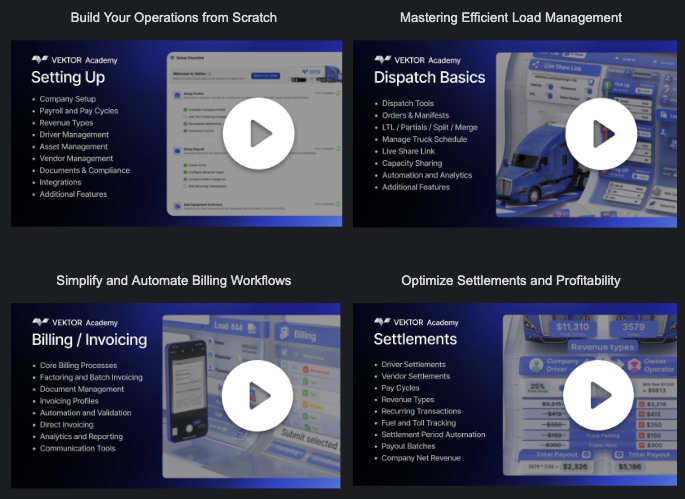
We’re excited to introduce our first Vektor training course, designed to help you get the most out of Vektor. This comprehensive course covers:
Setting up your company and core configurations.
Dispatch functionality.
Billing, invoicing, and settlements.
This is just the beginning! More advanced training sections are in development, so stay tuned for future updates.
How to Access:
To gain access to the course, simply email your request to support@vektortms.com.
Money Codes Leave Beta
We’re excited to announce that Money Codes has officially left beta! As one of our fastest-adopted features, we’ve refined its functionality to make it even more user-friendly and efficient.
Key Updates Include:
Geolocation as an Optional Field: Enjoy greater flexibility by choosing whether or not to include geolocation data when using Money Codes.
Streamlined Workflow: Access the Money Codes dialog directly from orders with listed stops, simplifying the process and saving valuable time.
These updates ensure a smoother experience, empowering you to manage financial transactions with ease.
Transaction Improvements
We’ve enhanced the Transactions functionality to provide more robust management for a variety of use cases. These updates make it easier to handle recurring transactions and streamline financial workflows.
Key Updates Include:
Simplified Vendor Recurring Transactions: Easily create and monitor recurring transactions for vendors.
Driver Deductions Integration: Driver deductions are now automatically passed to vendor settlements for seamless financial tracking.
Improved Recurring Transaction Management: Deleting and managing recurring transactions is now more intuitive and efficient.
Start Dates for Better Scheduling: Specify when each recurring transaction begins to ensure precise financial planning.
Permissions for Company Settlement Views
In our previous release, we introduced the ability to track each truck’s profitability. However, we understand that financial data often requires privacy. To address this, we’ve added permissions for viewing company settlements, allowing you to:
Control Access: Limit the ability to view sensitive financial information, such as company profit or loss, to authorized users only.
Enhance Privacy and Security: Protect your financial data by ensuring it’s only accessible to those who need it.
📦 Update for Amazon Relay Integration
We’ve enhanced the Amazon Relay extension in this release, enabling seamless integration with the newly introduced Tours feature. This update allows you to:
Extract Tours from Amazon Relay: Automatically pull Tours from Amazon Relay and save them in Vektor under the Tours section in the planning tab.
Achieve 100% Integration: This update ensures full compatibility, making it easier and faster to track trips directly through Vektor.
Improve Workflow and Visibility: Streamline your operations with enhanced synced visibility and better trip management.
Batch Invoice PDF Download
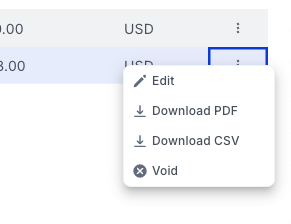
We’ve introduced a new feature that allows you to download batch invoices as PDFs directly from the Invoices tab in the Billing section.
How It Works:
After creating a batch invoice, it will appear in the Invoices tab.
From there, you can easily generate and download the PDF for sharing or record-keeping.
Dashboard & Driver App Performance
We’ve completed a significant rework of the entire document and manifest architecture, resulting in:
Streamlined Paperwork Uploads: Faster and more efficient handling of documents.
Improved Data Exchange: More compact and quicker data processing.
Faster Loading Times: Enhanced performance for both the dashboard and the driver app.
We hope you’re as excited about these updates as we are! Your feedback is invaluable in helping us improve and deliver features that truly make a difference. Let us know what you think of this update in the comment section below, or feel free to email your questions, suggestions, or requests to support@vektortms.com.
Thank you for being a part of the Vektor community—we’re here to support you every step of the way!